
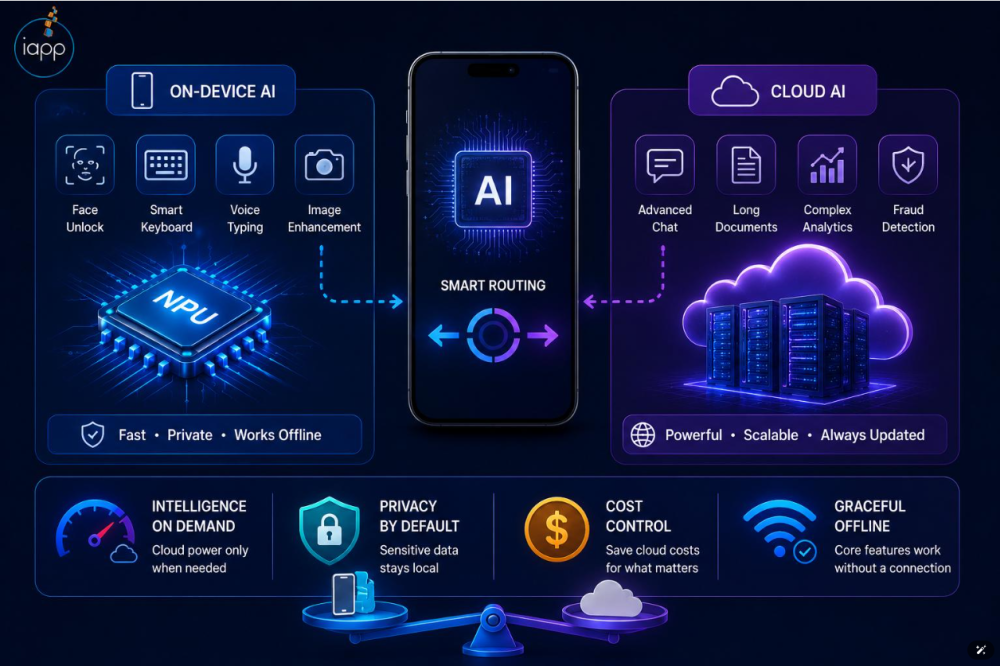
On-Device AI vs Cloud AI: Which Is Better for Mobile Applications in 2026?
Artificial intelligence has become a major part of modern mobile app development. From intelligent chatbots and voice assistants to personalized recommendations and real-time image recognition, AI is changing how users interact with mobile applications.
However, businesses and developers face an important question: Should AI processing happen directly on a mobile device or through cloud-based servers?
Both on-device AI and cloud AI offer powerful capabilities, but they differ in performance, privacy, cost, scalability, and internet dependency.
In this guide, we'll explore the differences between on-device AI and cloud AI, their advantages and limitations, practical applications, and how businesses can choose the right AI architecture for mobile applications in 2026.
What Is On-Device AI?
On-device AI, also known as edge AI in mobile computing, refers to artificial intelligence models that process information directly on a smartphone, tablet, or another local device instead of sending every request to a remote server.
These models use the device's hardware, including its CPU, GPU, and Neural Processing Unit (NPU), where available, to perform AI operations.
For example, a mobile application can use on-device AI to recognize objects in photos, detect facial landmarks, translate text, or analyze user activity without uploading the underlying information to a cloud server.
Key Features of On-Device AI
-
Offline functionality: Supported features can work without an active internet connection.
-
Fast responses: Local processing eliminates the network round trip.
-
Enhanced privacy: Information can remain on the user's device.
-
Lower cloud inference costs: AI requests can run without paying a cloud provider for every inference.
-
Personalized experiences: Applications can process locally available user information.
Real-World Example
Consider a fitness application that uses AI to analyze exercise posture through a smartphone camera.
With on-device AI, the application can detect body movements and provide feedback while keeping camera frames on the device.
This makes the experience responsive and can reduce the need to upload sensitive visual information.
What Is Cloud AI?
Cloud AI refers to artificial intelligence processing performed on remote servers rather than directly on a user's mobile device.
The mobile application sends a request to a cloud service, where a model processes the information and returns its response.
Cloud AI is commonly used for advanced conversational assistants, large-scale language generation, complex image analysis, and applications that need substantial computational resources.
Key Features of Cloud AI
-
Powerful computing resources: Cloud infrastructure can host larger and more demanding AI models.
-
Advanced AI capabilities: Applications can access sophisticated language, vision, and multimodal models.
-
Centralized updates: Developers can improve AI models without requiring every user to download new model files.
-
Scalable infrastructure: Computing capacity can be adjusted to application demand.
-
Cross-device consistency: Users can access the same AI service from multiple devices.
Real-World Example
Imagine an AI-powered educational application where students ask detailed questions about mathematics, science, or programming.
The application can send questions to a cloud-based language model that generates explanations, examples, and personalized learning material.
This approach is useful when the application requires more reasoning capacity or knowledge than a compact local model can provide.
On-Device AI vs Cloud AI: Key Differences
Understanding the differences between these two approaches helps businesses choose the right architecture for their mobile applications.
| Feature | On-Device AI | Cloud AI |
|---|---|---|
| AI Processing | Mobile device | Remote servers |
| Internet Connection | Not required for local inference | Generally required |
| Response Speed | Avoids network delays | Depends partly on network latency |
| Data Privacy | Data can remain local | Data is transmitted to a provider |
| Model Capabilities | Limited by device resources | Can support larger models |
| Operating Cost | Lower per-request cloud costs | Recurring infrastructure or API costs |
| Battery Usage | Uses local processing power | Offloads substantial processing |
| Scalability | Depends on user devices | Server capacity can be scaled |
| Updates | May require model or OS updates | Models can be updated centrally |
Neither approach is universally better. The best choice depends on an application's requirements, target users, and available resources.
Benefits of On-Device AI for Mobile Applications
1. Faster User Experiences
One of the biggest advantages of on-device AI is the ability to process information without communicating with a remote server.
For lightweight tasks, this can significantly reduce delays and create smoother interactions.
Applications involving camera processing, gesture recognition, and live movement tracking can particularly benefit from local inference.
However, on-device AI is not always faster for computationally demanding tasks. Actual performance depends on the model size and device hardware.
2. Improved Data Privacy
Privacy is an important consideration for modern mobile applications.
On-device AI allows developers to process certain sensitive information locally, reducing the amount of personal data transmitted to external services.
This can be especially valuable for healthcare, fitness, personal productivity, and financial applications.
Local processing does not automatically guarantee complete security, but it can reduce data exposure when implemented correctly.
3. Offline AI Functionality
On-device AI can provide intelligent features even when users have limited or no internet connectivity.
For example, a travel application could offer supported offline translation features, while a productivity application could classify notes or organize documents locally.
This creates a more reliable user experience in areas with inconsistent network coverage.
4. Reduced Cloud Processing Costs
Cloud AI services commonly charge for API usage, computing resources, or processed data.
On-device processing can reduce these ongoing inference expenses because compatible devices perform the calculations themselves.
However, businesses must still consider model optimization, testing, development, maintenance, and device compatibility costs.
Benefits of Cloud AI for Mobile Applications
1. Access to More Powerful AI Models
Cloud AI allows applications to use models that would be too large or computationally expensive for many smartphones.
This can support advanced reasoning, document analysis, detailed conversations, and complex multimodal tasks.
2. Easier Model Management
Cloud-based models can be improved, replaced, and monitored centrally.
This allows development teams to deploy AI updates without requiring users to manually download a new model.
3. Support for Complex Applications
Cloud AI is particularly suitable for applications that process large documents, generate extensive content, or combine data from multiple external systems.
Examples include enterprise AI assistants, advanced customer support systems, and business intelligence applications.
4. Flexible Scaling
Cloud infrastructure allows businesses to increase processing capacity as demand grows.
However, higher usage can also increase operational expenses, making cost optimization an important part of system design.
Challenges of On-Device AI and Cloud AI
Both approaches come with limitations that developers must consider.
Challenges of On-Device AI
Hardware limitations: Older smartphones may lack the memory or processing capacity required by advanced AI models.
Battery consumption: Continuous AI processing can increase battery usage and device temperature.
Model size: Large models can consume significant storage space.
Device compatibility: AI features may perform differently across operating systems, hardware configurations, and supported devices.
Challenges of Cloud AI
Internet dependency: Cloud-based AI features generally require an active network connection.
Network latency: Slow connections can delay AI responses.
Recurring costs: API requests, server infrastructure, and data processing can create ongoing expenses.
Privacy considerations: Developers must carefully manage the transmission, storage, retention, and protection of user information.
These challenges make architecture planning important before adding AI features to a mobile application.
On-Device AI vs Cloud AI: Which Is Better for Different Applications?
The ideal choice often depends on what an application needs to accomplish.
Fitness and Healthcare Applications
On-device AI can be useful for motion tracking, exercise posture detection, and local health-data analysis.
Cloud AI can support more computationally demanding features such as advanced conversational coaching and complex analysis of historical information.
A hybrid approach may be suitable when privacy-sensitive processing should remain local while optional advanced features use cloud services.
E-Commerce Applications
On-device AI can support image classification, basic visual search, and personalized interactions.
Cloud AI is useful for extensive product catalogs, conversational shopping assistants, and recommendation systems that combine information from multiple sources.
Educational Applications
On-device AI can support offline language assistance, basic text analysis, and interactive learning features.
Cloud AI can handle detailed explanations, extensive document processing, and sophisticated tutoring conversations.
Business and Productivity Applications
On-device AI can help users organize notes, classify content, and perform supported local summarization.
Cloud AI may be more suitable for complex document workflows, enterprise integrations, and AI agents that interact with business systems.
Hybrid AI: Combining On-Device AI and Cloud AI
In 2026, businesses do not necessarily have to choose only one AI processing approach.
Hybrid AI architecture combines local processing with cloud-based intelligence, allowing developers to select the most suitable processing environment for each task.
For example, a mobile application could:
-
Use on-device AI to recognize speech or understand a basic command.
-
Process simple requests directly on the smartphone.
-
Send complex requests to a cloud model when appropriate.
-
Return the response to the application.
-
Store sensitive information locally when possible.
This strategy can balance performance, privacy, and advanced AI capabilities.
Why Hybrid AI Is Important
Hybrid AI can help businesses:
-
Reduce unnecessary cloud requests.
-
Improve responsiveness for local tasks.
-
Preserve offline functionality for supported features.
-
Access more advanced AI models when required.
-
Design stronger privacy controls around sensitive data.
However, developers must carefully define when information can leave the device and ensure users understand how their information is processed.
Technologies Used for On-Device AI Development
Several development technologies make it easier to integrate AI directly into mobile applications.
Apple Core ML
Core ML enables developers to integrate machine learning models into applications across Apple's platforms.
It supports hardware-accelerated inference, allowing compatible applications to perform tasks such as image classification, object detection, and predictive analysis.
Apple Foundation Models
Apple's Foundation Models framework provides developers with access to AI capabilities designed for tasks such as text generation, summarization, and structured output.
Supported models and execution modes depend on the operating system and device capabilities.
Google ML Kit
Google ML Kit provides mobile-friendly machine learning APIs for Android and iOS applications.
It supports features such as text recognition, image labeling, and language identification.
Google AI Edge and Gemini Nano
Google AI Edge provides tools for deploying AI models on mobile and edge devices.
Gemini Nano enables supported Android devices to perform generative AI tasks locally through compatible APIs.
Developers should evaluate model availability, hardware support, and operating system requirements before selecting a technology.
How to Choose Between On-Device AI and Cloud AI
Before choosing an AI architecture, businesses should evaluate five important factors.
1. Application Requirements
Determine whether the application needs simple real-time processing or advanced AI generation.
Local models may be sufficient for straightforward tasks, while demanding features may require cloud infrastructure.
2. Target Audience and Devices
Consider the smartphones and operating systems your customers use.
If the audience includes many older devices, relying exclusively on resource-intensive local AI models may limit accessibility.
3. User Privacy
Identify what information the AI system needs to process.
Sensitive data may benefit from local processing, while cloud-based workflows require appropriate protection, permissions, and data-handling practices.
4. Development and Operating Costs
Compare initial development costs with ongoing infrastructure costs.
Cloud AI may reduce device-side complexity but introduce usage-based expenses. On-device AI can lower inference fees while increasing optimization and compatibility work.
5. Future Scalability
Consider how the application will evolve.
If future features require large models, shared data, or integrations with business systems, a cloud or hybrid architecture may offer greater flexibility.
The Future of AI in Mobile Applications
Mobile AI technology continues to develop rapidly.
Modern smartphones are increasingly equipped with specialized AI hardware, while compact AI models are becoming more capable.
At the same time, cloud-based AI services continue to provide access to advanced models and large-scale computing resources.
Several developments are shaping the future of mobile AI:
-
More capable AI models running directly on smartphones.
-
Greater adoption of privacy-focused AI processing.
-
Improved hardware acceleration for mobile inference.
-
Smarter hybrid AI systems that select local or cloud processing based on the task.
-
AI-powered personalization across fitness, education, productivity, and commerce applications.
For businesses, the key opportunity is not simply adding AI to an application. It is selecting technology that improves the user experience while maintaining reliability and sustainable operating costs.
How AppCodie Can Help Build AI-Powered Mobile Applications
At AppCodie, we help businesses transform application ideas into practical digital experiences.
Whether you're planning a new AI-powered mobile application or want to integrate intelligent features into an existing product, choosing the right architecture is an important first step.
Our mobile and web development approach focuses on application performance, user experience, scalability, and practical technology integration.
AI-powered solutions can include intelligent chatbots, personalized recommendations, automated workflows, analytics, and mobile experiences that combine local processing with cloud-based capabilities.
Looking to build an AI-powered mobile app?
Connect with AppCodie to discuss your project requirements and explore an AI integration strategy suited to your business goals.
Conclusion
The choice between on-device AI and cloud AI depends on the requirements of your mobile application.
On-device AI is particularly valuable when privacy, offline functionality, and low-latency processing are priorities.
Cloud AI is often more appropriate for complex AI tasks, larger models, and applications that require substantial computing resources.
For many modern applications, a hybrid architecture offers a practical balance between these approaches.
As AI technology continues evolving in 2026, businesses that select the right processing architecture will be better positioned to create intelligent, responsive, and scalable mobile experiences.
Frequently Asked Questions (FAQs)
1. What is the main difference between on-device AI and cloud AI?
On-device AI processes information directly on a smartphone or other local device, while cloud AI sends requests to remote servers for processing.
2. Is on-device AI faster than cloud AI?
On-device AI can be faster for lightweight, real-time operations because it avoids network delays. Cloud AI may perform better for complex tasks requiring greater computing power.
3. Can on-device AI work without the internet?
Yes. Properly configured on-device AI models can perform supported tasks offline, provided all required model files and resources are available locally.
4. Is cloud AI more expensive than on-device AI?
Cloud AI often involves ongoing API or infrastructure expenses. On-device AI can reduce these charges but may require additional development, testing, and optimization.
5. Which AI approach is better for mobile app development in 2026?
On-device AI is useful for privacy-sensitive and offline features. Cloud AI is suitable for computationally intensive tasks. A hybrid approach can combine the benefits of both.
6. Is on-device AI more secure than cloud AI?
On-device AI can reduce the transmission of personal information, but security depends on how the application protects models, stored data, and device access. Both approaches require appropriate security measures.
7. Can an application use both on-device AI and cloud AI?
Yes. Hybrid AI applications can process certain tasks locally and use cloud models for more demanding features, providing flexibility across performance, privacy, and model capabilities.